tile creation: ilc.com:cssi/charts
testing site: https://cherry.ilikecarrots.com/
import gdal2tiles is broken (core dump)import gdal2tiles runs, but causes excessive memory usateget area, high:
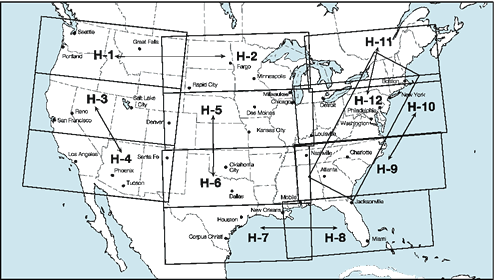
high index: https://www.faa.gov/air_traffic/flight_info/aeronav/digital_products/ifr/assets/img/High_Index_US.gif
    . charts.sh
    ( cd /cygdrive/c/Users/wendell/Documents/cssi/charts )
    cd origs
    ./get_planning.sh
    ./get_high.sh
unzip all:
    cd /cssi/charts/tiffs
    ./do_unzip.sh
Desktop -> QGIS 2.18 -> QGIS 2.18.12
Documents/cssi/charts/high/files / ENR_H10.tif
Layer -> Add Layer -> Add Raster Layer

Project -> Project Properties

-> CRS
    * Enable 'on the fly' CRS transformation
    -> WGS84

View -> Panels
    * Coordinate Capture

"Coordinate Capture" window should show under Layers Panel

-> mouse symbol
-> + Start capture

top level of icons -> hand/finger to stop capture
then, to process points:
    -> Start capture
    -> click on map
    -> Copy to clipboard
    -> paste to text file
resulting text file should look like:
    -95.98341,26.47378,1683.501,-1392440.650
    -82.34412,25.52097,1396648.639,-1394918.386
    -82.52176,24.29700,1399126.375,-1534910.447
    -76.40241,23.28251,2050770.835,-1532432.711
    -71.78134,39.38306,2050770.835,317196.907
    -66.51430,41.29903,2414997.967,649213.477
    -63.22695,47.94451,2412520.231,1432177.923
    -95.95850,51.82318,2922.369,1429700.188
put into python file (SOMEWHERE):
    #======================== East planning
    from_qgis = (
    ( -95.78784,26.56422,21505.386,-1382219.991),
    ( -82.20837,25.56592,1409656.751,-1387794.896),
    ( -82.28878,24.43295,1420806.561,-1516017.713),
    ( -76.40945,23.48121,2045195.930,-1510442.808),
    ( -71.90407,39.41770,2039621.025,318126.058),
    ( -66.67054,41.31785,2401989.855,647045.458),
    ( -63.47505,47.90963,2396414.950,1421957.264),
    ( -95.69552,51.65656,21505.386,1410807.454),
     )
    p0 = [ from_qgis[0][0], from_qgis[0][1] ]
    p1 = [ from_qgis[1][0], from_qgis[1][1] ]
    p2 = [ from_qgis[2][0], from_qgis[2][1] ]
    p3 = [ from_qgis[3][0], from_qgis[3][1] ]
    p4 = [ from_qgis[4][0], from_qgis[4][1] ]
    p5 = [ from_qgis[5][0], from_qgis[5][1] ]
    p6 = [ from_qgis[6][0], from_qgis[6][1] ]
    p7 = [ from_qgis[7][0], from_qgis[7][1] ]

    bounds = [ p0, p1, p2, p3, p4, p5, p6, p7, p0 ]  # ends with starting point
and edit for shapefile filename
run it:
    01:28:03 cutfiles $ python3.7 create_cutfile_shapefile.py

    [[-95.98341, 26.47378], [-82.34412, 25.52097], [-82.52176, 24.297], ...
see if it looks right using this web site: https://mapshaper.org/
-> Select
    navigate to hoo.shp
    cd ../crop
    02:46:37 crop $ gdalwarp -cutline ../cutfiles/plan_east.shp -crop_to_cutline  ../tiffs/US_IFR_PLAN_EAST.tif ifr_plan_east.tif

    Creating output file that is 9647P x 11906L.
    Processing input file ../tiffs/US_IFR_PLAN_EAST.tif.
    0...10...20...30...40...50...60...70...80...90...100 - done.
had to install local GDAL (on ilc, now OBSOLETE):
./configure --prefix=/home/wendell/usr/local --with-python=/home/wendell/usr/local/bin/python3.7 --with-geos=yes
which installed lots of gdal* programs into ~/usr/local/bin, including gdal2tiles.py!
then: (NOTE: do east last, so for any overlap, those are the ones "on top")
    $ gdal2tiles.py crop/ifr_plan_west.tif tiles
    $ gdal2tiles.py crop/ifr_plan_east.tif tiles
~/webapps/staticserver/tiles~/perti/wendell/httpd/tilesALL STEPS work from laptop
Getting better, but clip region does not seem right.
something doesn't work on the clipping
from: https://uhurulabs.org/2017/03/31/pix4d-geotiff-transparency/
and this: https://lists.osgeo.org/pipermail/discuss/2011-June/009088.html
    > cd a_nodata/

    > gdal_translate -a_nodata 0 -of GTiff ../crop/h10_cut.tif  h10_nodata0.tif
    Input file size is 19903, 8654
    0...10...20...30...40...50...60...70...80...90...100 - done.

    > gdal_translate -a_nodata 0 -of GTiff ../crop/h12_cut.tif  h12_nodata0.tif
    Input file size is 17943, 24370
    0...10...20...30...40...50...60...70...80...90...100 - done.

    > gdal_merge.py  -n 0 -a_nodata 0 -o a_nodata_merge.tif h10_nodata0.tif  h12_nodata0.tif
    0...10...20...30...40...50...60...70...80...90...100 - done.
YIPEE!!__ (mostly)
However, colors are messed up.
PROBABLY the NODATA value of 0 makes black into transparent!
gdal_translate says:
    -a_nodata <value>

        Assign a specified nodata value to output bands. It can be set
        to <i>none</i> to avoid setting a nodata value to the output
        file if one exists for the source file. Note that, if the
        input dataset has a nodata value, this does not cause pixel
        values that are equal to that nodata value to be changed to
        the value specified with this option.
gdal_merge.py says:
    -n <nodata_value>
    Ignore pixels from files being merged in with this pixel value.

    -a_nodata <output_nodata_value>
    Assign a specified nodata value to output bands.
SO, need to pick a value that isn't used!
try to find all used colors:
> gdalinfo -hist h09_cut.tif
Driver: GTiff/GeoTIFF
Files: h09_cut.tif
Size is 20017, 8720
Coordinate System is:
PROJCS["US_IFR",
    GEOGCS["NAD83",
        DATUM["North_American_Datum_1983",
            SPHEROID["GRS 1980",6378137,298.2572219999988,
                AUTHORITY["EPSG","7019"]],
            AUTHORITY["EPSG","6269"]],
        PRIMEM["Greenwich",0],
        UNIT["degree",0.0174532925199433],
        AUTHORITY["EPSG","4269"]],
    PROJECTION["Lambert_Conformal_Conic_2SP"],
    PARAMETER["standard_parallel_1",45],
    PARAMETER["standard_parallel_2",33],
    PARAMETER["latitude_of_origin",39],
    PARAMETER["central_meridian",-95],
    PARAMETER["false_easting",0],
    PARAMETER["false_northing",0],
    UNIT["metre",1,
        AUTHORITY["EPSG","9001"]]]
Origin = (630268.983711699955165,-58880.072046399975079)
Pixel Size = (92.600603671129548,-92.605677317798182)
Metadata:
  AREA_OR_POINT=Area
  TIFFTAG_DATETIME=2019:05:30 10:31:12
  TIFFTAG_RESOLUTIONUNIT=2 (pixels/inch)
  TIFFTAG_SOFTWARE=GPL Ghostscript 8.71
  TIFFTAG_XRESOLUTION=400
  TIFFTAG_YRESOLUTION=400
Image Structure Metadata:
  INTERLEAVE=PIXEL
Corner Coordinates:
Upper Left  (  630268.984,  -58880.072) ( 87d45'15.66"W, 38d14'20.38"N)
Lower Left  (  630268.984, -866401.578) ( 88d25'29.14"W, 30d58' 2.07"N)
Upper Right ( 2483855.267,  -58880.072) ( 67d16'40.27"W, 35d 0'37.54"N)
Lower Right ( 2483855.267, -866401.578) ( 69d42'55.33"W, 28d 3'31.31"N)
Center      ( 1557062.126, -462640.825) ( 78d 7'54.20"W, 33d30'11.54"N)
Band 1 Block=20017x1 Type=Byte, ColorInterp=Red
0...10...20...30...40...50...60...70...80...90...100 - done.
  256 buckets from -0.5 to 255.5:
  37124675 216 294 157 426 163 338 260 812 350 151 207 1025 726 167 531 558 116642 536 2 167 6 186 152 822 492 152 340 1488 154 159 660 1249 23 80866 8 300 85 424 137 462 1583 6 42 58 139 143 275 532 640 318 79568 0 346 156 636 1588 1478 118 128 802 219 166 1150 0 471 313 1 173175 204 1 207 141 330 650 170 447 123 116 161 157 144 1140 92 28 209386 0 417 131 86793 1286 87 161 551 68 257 45 525 598 29 2235 185 86522 269 13 213 6 745 193 356 1099 1820 213 627 51 1413 100 14 91 220525 211 566 1549 2343641 138 350 99 783 205 80 88 67 17303 4306 41 94 53804 316 260 266 270582 11735 23 128 3015 109 339 427 3150 11781 190 139 211 89036 84 2329 1562 151 23753 236 188 52 278 2252 78 21 40122 25544 38 21 143964 6050 191 152 261 293 12600 130 1858 1896 129 84 286854 71 176 31324 2376 172724 126 1627 580 547008 145 64 15574 32 120 16 34 16 194611 36 14151 136 78827 8 172599 252 141388 2398 0 13358 10 15 67 4 95 110604 0 8 24022 85369 1465 210 5 5791 173830 3 0 12370 0 100736 2350 1721 8 128479 0 0 131647 81 2238 0 0 0 2442 0 0 16941 3257 0 217 0 0 0 0 130766521
Band 2 Block=20017x1 Type=Byte, ColorInterp=Green
0...10...20...30...40...50...60...70...80...90...100 - done.
  256 buckets from -0.5 to 255.5:
  33468611 117 244 94 324 92 245 134 73 197 450 484 120 320 127 474 279 47259 413 67 343 12 502 82 68 91 51 160 1467 109 124 831 153 2717036 32629 152 131 187 154 231 85927 914 67 208 193 170 263 36074 233 201 257 32778 83 101 2439 378 1534 237 61 270 212 149 24202 717 307 428 136 39 63210 5 68 189 668 516 154 320 184 23358 406 465 301 391 570 1617 31 137498 234 414 321 269 515 98 48121 368 124 372 334 3459 140 31 104 231 35105 951 193 146 210 55339 34 181 1246 382 3075 712 862 134 154 135 124 79973 74 88 25662 51 267 132 1635 233 304 141 203 377 112 262 399 19 21649 62817 190 167 274064 100 133 215 102 512 103 533 3196 322 208 15938 37 34851 35 2149437 106 572 222 356 250 275 14594 2291 176 144 66063 54 10008 1622 87708 6256 251 574 153 10044 119 456 525 939370 195 40153 19129 464 36243 419 2673 60426 431 44474 903 507984 263 178 31126 10538 48782 104 3358 178 63688 139 27073 92 31391 16337 335 582 657 9396 26386 23555 1629 143 259 88141 49 1863 85 202 16465 230897 8782 101214 3287 33617 27569 1857 2210 19338 21243 199 2463 1717 73 76755 286974 6095 48154 211975 27736 231266 12759 141010 1626 26783 113635 1 177011 15789 163556 2361 0 3265 0 130766521
Band 3 Block=20017x1 Type=Byte, ColorInterp=Blue
0...10...20...30...40...50...60...70...80...90...100 - done.
  256 buckets from -0.5 to 255.5:
  34491810 116 179 96 283 96 205 142 0 278 113 159 549 585 383 824 9 83344 504 0 127 8 141 101 8 402 187 346 1538 165 104 896 0 24 58557 2 155 235 152 269 395 5 126 58 95 217 127 538 5 2 683 57121 318 7 468 382 1623 123 73 187 0 196 524 1504 3 410 21 0 128794 33 178 217 469 140 17 273 207 4 166 1190 5 344 2 3 12 156516 0 384 720 435 68 561 102 51 0 953 2 3 4 262 357 85 62711 300 109 3 6 146 38 160 910 1176 149 855 27 194 61 47 239 162204 1 12 252 0 0 459 99 636 43 1 65 288 0 147 1 197138 39115 300 453 14 269978 160 95 3725 303 460 35 167 3138 26 725 2062 3 64071 10 2267 166 302 60 2924 49 48 371 2593 5 23 39779 4945 139 22 105636 5986 190 172629 102 2522 330 293 357 1947 24 37 8 2640 260 6 2474 127215 286898 0 766 341529 249 217 7289 174 212208 46 487 1466 316 23 1869 196 249887 379 205 3331 704 2667 498 158 141312 234 101201 1895 687 2718845 750 1026 36158 171049 24285 5957 454 29402 568 592 48121 173976 55322 2519 2523 25596 246 62685 267 128828 2247157 2630 42610 9761 9951 58369 19936 58685 25343 3284 33549 10034 34304 19183 10267 46394 13676 130766521
edit out just the lines that may be pixel values...
> sed 's/ /\n/g' buckets.txt | sort -n | uniq | less
suggested outline for mynotes:
as before: 1) download 2) unzip 3) manually determine crop region
from here on, just doing high charts:
4) generate cropping cutfiles / shapefiles
5) crop
    cd crop
    <edit for loop for all high charts, comment out area for this test>
    ./do_crops.sh
pertinent command:
gdalwarp -cutline ../cutfiles/h${C}.shp -crop_to_cutline ../tiffs/ENR_H${C}.tif h${C}_cut.tif
real 5m1.109s
6) translate:
    cd c_nodata
    ./do_translate.sh
pertinent command:
gdal_translate -a_nodata 8 -of GTiff ../crop/h${H}_cut.tif h${H}_nodata8.tif
real 5m8.393s
EXIT all other programs, then:
7) merge:
time ./do_merge.sh
real 21m25.698s
pertinent command:
gdal_merge.py -n 8 -a_nodata 8 -o a_nodata_merge.tif `ls h??_nodata8.tif`
8) make tiles:
    > time ./do_sunday.sh
    + gdal2tiles.py c_nodata/a_nodata_merge.tif tiles_nodata_c

    real    67m44.843s
    user    61m48.138s
    sys     3m22.949s
btw, that was WITH sleeping
9) tar cvf ...
10) scp
> scp t_nod_c_high_only.tar wendell@ilikecarrots.com: t_nod_c_high_only.tar
elapsed:  04:48
PROBLEM: with '8' for -a and -nodata, crop regions are not right
=============================================
Consider: use gimp or qgis to view merged file before generating tiles.
NO, gimp can't handle 2.5G files.
(now with tile subdir UNDER dir containing translate/nodata/merge .tiff files
dir:       charts/a_nodata
charts:    H02, H05, H09, H10, H11
translate: gdal_translate -a_nodata 0 -of GTiff ../crop/h${H}_cut.tif  h${H}_nodata0.tif
merge:     gdal_merge.py  -n 0 -a_nodata 0 -o a_nodata_merge.tif `ls h??_nodata0.tif`

check in QGIS here

tile gen:  gdal2tiles.py a_nodata_merge.tif tiles_nodata_a
result: in QGIS, missing pixels are white, which is confusing
dir:       charts/b_nodata
charts:    H02, H05, H09, H10, H11
translate: gdal_translate -a_nodata 8 -of GTiff ../crop/h${H}_cut.tif  h${H}_nodata0.tif
merge:     gdal_merge.py  -n 8 -a_nodata 8 -o a_nodata_merge.tif `ls h??_nodata0.tif

check in QGIS here

tile gen:  gdal2tiles.py a_nodata_merge.tif tiles_nodata_a
result: in QGIS, missing pixels are black, which shows up the bad projections
dir:       charts/c_nodata
charts:    all H
translate: gdal_translate -a_nodata 8 -of GTiff ../crop/h${H}_cut.tif  h${H}_nodata8.tif
merge:     gdal_merge.py  -n 8 -a_nodata 8 -o a_nodata_merge.tif `ls h??_nodata8.tif`

check in QGIS here

tile gen:  gdal2tiles.py a_nodata_merge.tif tiles_nodata_a
result: in QGIS, includes east coast diagonal (h12?), and shows how really messed up the merges are