Problem: opalstack drops connections, and when that happens ALL programs stop.
setup:
        cd ~/openmaptiles/vmpython
        source bin/activate
        export LD_LIBRARY_PATH=/home/wendell/usr/local/lib64:/home/wendell/usr/local/lib
postgresql:
        cd ~/openmaptiles
        ./start_stop_pg.sh start
postile:
        cd ~/openmaptiles/postile
        ./serve_postile.sh
test: mypostile.html
Most of the steps are from:
And an email from opalstack rcvd last Friday:
Re: my own server on port 8080?
From Sean F on 2021-09-30 19:37
------------- Alternative: Load with postile ---------------
postile --cors --tm2 openmaptiles.tm2source/data.yaml --pghost 127.0.0.1 --pguser [username] --pgpassword [password] --listen [ip] --pgdatabase osm --style style/style.json --fonts fonts/
1) at Domains & Sites:
tiles.ilikecarrots.com
later:
merc.ilikecarrots.com
2) Applications & Shell Users
    Name: postiles
    Type: Ngnix Proxy Port
    Shell User: wendell@opal4.opalstack.com
the port assigned is: 2760
later:
    Name: merc_pg_tileserv
    Type: Ngnix Proxy Port
    Shell User: wendell@opal4.opalstack.com
the port assigned is: 10491
3) Site Route (aka Add Site)
Site Name: tiles
Server: opal4.opalstack.com
IPv4: 172.241.24.147
Automatic Let's Encrypt: on
Encrypt (redirect http to https): yes
Routing:
  Route Domain: tiles.ilikecarrots.com
  Route Applications: postiles (w@o4.o.c)
later:
Site Name: merc_tiles
Server: opal4.opalstack.com
IPv4: 172.241.24.147
Automatic Let's Encrypt: on
Encrypt (redirect http to https): yes
Routing:
  Route Domain: merc.ilikecarrots.com
  Route Applications: merc_pg_tileserv (w@o4.o.c)
What's the difference???
-- other, slightly useful:
tilelive scripts:
> git clone https://github.com/Oslandia/postile.git
> cd postile/
and:
(vmpython) wendell@opal4:~/openmaptiles/postile/postile
> pip3 install cython
Successfully installed cython-0.29.24
and:
> pip3 install -e .

WARNING: pip is being invoked by an old script wrapper. This will fail in a future version of pip.
Please see https://github.com/pypa/pip/issues/5599 for advice on fixing the underlying issue.
To avoid this problem you can invoke Python with '-m pip' instead of running pip directly.
Obtaining file:///home/wendell/openmaptiles/postile/postile

Collecting mercantile
Collecting websockets<8.0,>=7.0
Collecting requests-async==0.5.0
Collecting multidict<5.0,>=4.0
Collecting httptools>=0.0.10
Collecting ujson>=1.35; sys_platform != "win32" and implementation_name == "cpython"
Collecting aiofiles>=0.3.0
Collecting uvloop>=0.5.3; sys_platform != "win32" and implementation_name == "cpython"
Collecting sanic-plugins-framework>=0.8.2
Collecting httpcore==0.3.*
Collecting setuptools>=40.0
Collecting h11==0.8.*
Collecting h2==3.*
Collecting rfc3986==1.*
Collecting hpack<4,>=3.0
Collecting hyperframe<6,>=5.2.0

Successfully installed Postile aiofiles-0.7.0 h11-0.8.1 h2-3.2.0 hpack-3.0.0
    httpcore-0.3.0 httptools-0.3.0 hyperframe-5.2.0 mercantile-1.2.1
    multidict-4.7.6 requests-async-0.5.0 rfc3986-1.5.0 sanic-19.6.3
    sanic-cors-0.9.9.post1 sanic-plugins-framework-0.9.5 setuptools-58.2.0
    ujson-4.2.0 uvloop-0.14.0 websockets-7.0
and at least it runs:
> postile --help
usage: postile [-h] [--tm2 TM2] [--mbtiles MBTILES] [--style STYLE]
               [--pgdatabase PGDATABASE] [--pghost PGHOST] [--pgport PGPORT]
               [--pguser PGUSER] [--pgpassword PGPASSWORD] [--listen LISTEN]
               [--listen-port LISTEN_PORT] [--cors] [--debug] [--fonts FONTS]

Fast VectorTile server with PostGIS backend

optional arguments:
  -h, --help            show this help message and exit
  --tm2 TM2             TM2 source file (yaml)
  --mbtiles MBTILES     read tiles from a mbtiles file
  --style STYLE         GL Style to serve at /style.json
  --pgdatabase PGDATABASE
                        database name
  --pghost PGHOST       postgres hostname
  --pgport PGPORT       postgres port
  --pguser PGUSER       postgres user
  --pgpassword PGPASSWORD
                        postgres password
  --listen LISTEN       listen address
  --listen-port LISTEN_PORT
                        listen port
  --cors                make cross-origin AJAX possible
  --debug               activate sanic debug mode
  --fonts FONTS         fonts location
1) manually copied style.json:
from: https://gitlab.com/Oslandia/postile-openmaptiles/-/blob/master/style.json
to: style/style.json
2) fonts
https://gitlab.com/Oslandia/postile-openmaptiles/-/tree/master#choose-a-mapbox-gl-style
which says to:
    mkdir fonts
    cd fonts
    wget https://github.com/openmaptiles/fonts/releases/download/v2.0/v2.0.zip
    unzip v2.0.zip
    rm v2.0.zip
    postile --cors  --tm2 openmaptiles.tm2source/data.yaml \
        --pghost localhost --pguser tiles --pgpassword opentiles --pgport 55432 --pgdatabase openmaptiles \
        --style style/style.json --fonts fonts/ \
        --listen-port 2760
NOTE: host 127.0.0.1 does not work; host localhost DOES work
> postile --cors  --tm2 openmaptiles.tm2source/data.yaml \
>     --pghost localhost --pguser tiles --pgpassword opentiles --pgport 55432 --pgdatabase openmaptiles \
>     --style style/style.json --fonts fonts/ \
>     --listen-port 2760
[2021-10-03 23:46:28 +0000] [148074] [INFO] Goin' Fast @ http://127.0.0.1:2760
++++ wt: setup_db_pg starting.
++++ wt: setup_db_pg ending.
[2021-10-03 23:46:28 +0000] [148074] [INFO] Starting worker [148074]
YIPEE!! (at least the server starts)
copied index.html from: https://github.com/Oslandia/postile-openmaptiles/blob/master/index.html
and edited style for:
style: 'https://tiles.ilikecarrots.com/style.json', // stylesheet location
file:///C:/cygwin64/home/wendell/gis/openmaptiles/opalstack/index.html
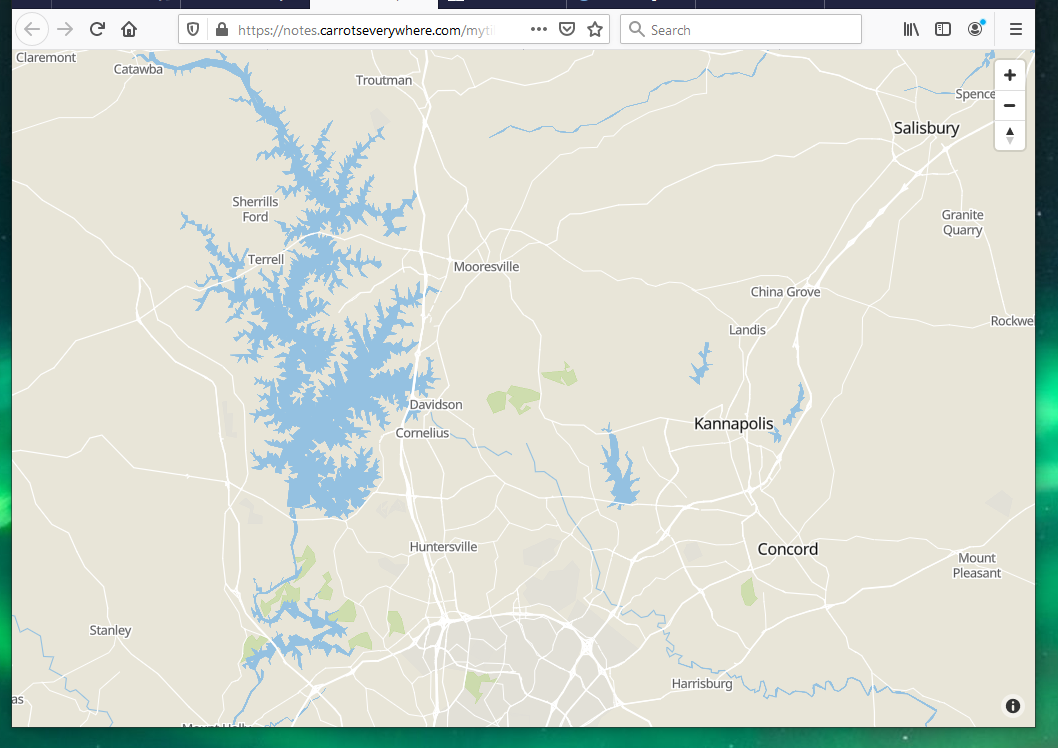
https://notes.carrotseverywhere.com/mytiles.html
lots of CORS errors
or this single reference:
Problem with layer_boundary table; commented that out if yaml,
MAYBE I didn't load_osm_borders.sh ???
However, after removing that, A MAP SHOWS UP!!!!